


Gun Sounds: Gun Simulator
4.62.93K Reviews
App Specs
- Version
- 383
- Updated On
- License
- Free
- Downloads
- 10,000,000+
- Developer
- AA Studio Game
- Categories
- Simulation
- Platform
- Android
Screenshots

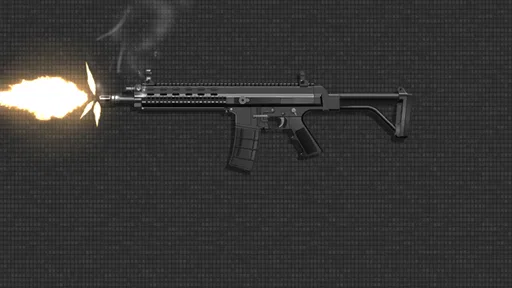


 Analysis by AppCompare
I judge a sound-effects app less by how many sounds it promises and more by how easily I can use it without creating an awkward moment. Gun Sounds: Gun Simulator is a simple entertainment game from AA Studio Game: its appeal is immediate, but the best experience depends on choosing the right setting and keeping the joke clearly harmless. It is free to download, with optional in-app purchases, and its focus is much narrower than a full action game or a firearm-training tool.
Where the experience can get stuck
The main friction is not learning complicated controls; it is managing expectations. A phone speaker can make a sound effect seem thin or quiet, while headphones may make it much louder to the listener than it seems to people nearby. I would test the volume with a short, ordinary sound before using the app around anyone else. That small check helps avoid startling someone or turning a casual joke into a disturbance.
It also helps to think of this as a collection of effects for amusement, not a simulation that teaches how firearms work. The sounds may be entertaining to compare, but they do not provide a reliable basis for identifying a real weapon or understanding safe handling. If you want instruction, technical reference material, or realistic practice, this is the wrong kind of app; a soundboard can offer novelty, not expertise.
Simple checks before pressing play
On first use, I would take a moment to browse rather than immediately starting a sound in public. Find the effect you want, check the phone’s media volume, and confirm that the audio is coming from the intended output. A Bluetooth speaker or connected headphones can change where the sound plays, so a quick test in a private setting is more useful than assuming the phone will behave the same way every time.
For a gathering, I would also decide in advance how the sound will be introduced. A brief, announced sound effect during a game is very different from playing a sudden gun noise behind someone. The latter can frighten people, be mistaken for a real emergency, or cause trouble in a shared public space. I would keep it to a consenting group in a private, suitable setting and avoid using it where people could interpret the noise as a threat.
The game is listed for Everyone 10+, which is a useful reminder that a sound-effects app still calls for judgment about audience and context. I would not hand it to a child and assume that every prank idea is appropriate. A parent or host can set a simple rule: use it only as an agreed sound effect, never to scare strangers or suggest that a real weapon is present.
Recovering when playback does not go as planned
If a sound does not come through, I start with the ordinary checks: make sure the phone is not muted, raise the media volume rather than relying on a ringtone setting, and check whether audio has been routed to a connected device. Then I would close and reopen the game and try again. These are sensible first steps for a sound app, without assuming that every playback issue has the same cause.
Worth Reading Before You Choose

EA SPORTS FC Mobile 26 Is a Bigger Football Game, but It Takes Time

Flipboard Shows What News Apps Must Do Beyond the Feed

Switching to Android Auto Means Rethinking Your Driving Routine

Google Calendar Makes a Crowded Week Easier to Manage

Ludo King Makes the Most of the Minutes Between Plans

Baby Panda World Brings Quick Play to Modern Phones, but Its Game Library Feels Busy
If the app feels slow or a control seems unresponsive, I would avoid tapping repeatedly; that can make it harder to tell whether the phone has registered an action. Give it a moment, then return to the screen and try once more. If the problem continues, restarting the app or the device is a reasonable basic troubleshooting step. Keeping the app current can also be worthwhile: the current version is 364, and it supports Android 7.0 or later.
One practical habit is to try the exact sound and output setup before friends arrive, rather than troubleshooting in the middle of a party. That also gives you a chance to decide whether the effect is too startling or simply not clear enough through the speaker. If it does not suit the room, skip it instead of turning the volume up until it becomes disruptive.
Exploring the Arsenal
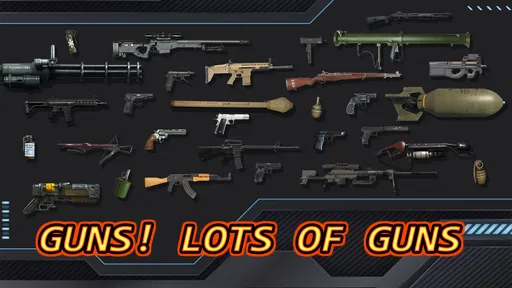
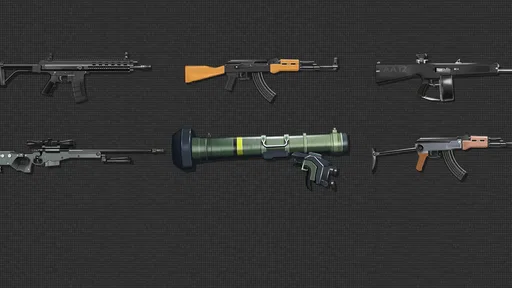
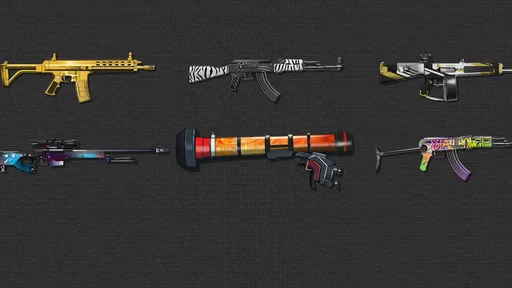
The first thing I noticed when I opened up Gun Sounds: Gun Simulator was the sheer variety of weapons available. I’m talking everything from pistols to rifles, and even some more exotic choices like futuristic blasters. The interface is pretty straightforward, making it easy to browse through the different categories. Each gun has its own unique sound, which is surprisingly accurate and satisfying to listen to.
One thing I really enjoyed was the attention to detail. The developers didn’t just slap on any old sound effect; you can tell they put effort into ensuring each gun sound is as close to the real thing as possible. For someone who’s never been to a shooting range, this app offers a safe and entertaining glimpse into the world of firearms.
Features That Stand Out
Aside from the realistic sounds, there are a couple of features worth mentioning. The app includes a reload animation for each weapon, adding an extra layer of realism. It’s not just about the bang; it’s about the full experience. The animations are smooth, and honestly, it’s fun to play around with them.
Another cool feature is the ability to create custom playlists of your favorite gun sounds. Whether you’re using the app for a prank or just want to impress your friends with your virtual arsenal, this feature lets you easily access the sounds you love most.
That playlist option is more useful when treated as a short, planned sequence than as background noise. I would choose a few effects that fit a game or a sound-effects challenge, put them in an order, and let listeners guess which one they heard. This keeps the activity focused and avoids the tedious experience of scrolling through sounds while everyone waits. It is also a good way to use the app without relying on a startling surprise.
There is a trade-off, though: a playlist is convenient, but it does not turn the app into a general music player or a production studio. If your goal is to build layered scenes, edit audio, or mix effects with dialogue, a dedicated audio-editing tool is a better fit. Here, the appeal is quick access to themed sounds and the visual interaction that goes with them, rather than precise creative control.
Choosing the right occasion
A realistic everyday use would be a small game night at home. I might let friends take turns hearing a sound and guessing whether it came from a pistol, rifle, or more unusual effect, making it clear beforehand that the audio is from a phone. That gives the sounds a purpose beyond simply startling someone, and it works best when the room is calm enough for people to hear the differences.
It can also work as a novelty soundboard for a private skit or a playful themed gathering. I would use it sparingly: one well-timed effect can land, while repeated loud playback quickly becomes irritating. If guests are not comfortable with gun sounds, choose another activity. The app is not a good fit for children who may take the effects literally, people who are sensitive to sudden noises, or any setting where a gunshot could be mistaken for a real incident.
Compared with a basic soundboard, this game is more specifically centered on firearm-style effects and their visual presentation. A general soundboard is more versatile for alarms, comedy cues, and everyday noises; an action game offers goals and ongoing play; and a professional sound library is better for controlled production work. I would choose this one when the specific novelty is the point, not when I need a broad sound collection or deeper gameplay.
Perfect for Pranks and Parties
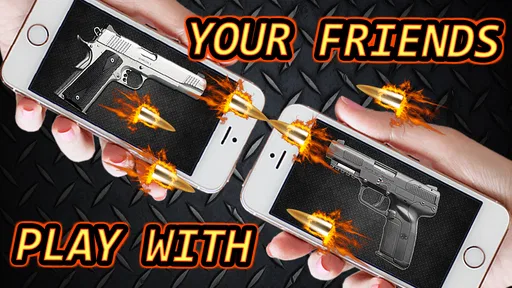
Now, let’s talk about the fun factor. This app is a blast (pun intended) for pranking your friends. Imagine sneaking up behind someone and playing the sound of a machine gun—it’s bound to get a reaction! Of course, make sure your friends are in on the joke and that you’re in a suitable environment. It’s all about having a good laugh.
Additionally, Gun Sounds: Gun Simulator can be a hit at parties. You can use it to add sound effects to games or just as a conversation starter. The app is easy to navigate, so even if someone isn’t tech-savvy, they’ll have no trouble diving in and exploring the sounds.
I would put a clear boundary around the word “prank”: it should mean a joke with people who are comfortable with it, not a surprise that makes anyone believe they are in danger. I would never play these effects in a school, transit hub, workplace, shop, or other public place, and I would not use them to imitate an emergency. If the group wants a surprise sound, agree on the general idea first and keep the volume modest.
For anyone deciding whether to install it, the practical details are straightforward. It is a free simulation game, rated 4.6 on average from around 71,000 ratings, and it has more than 10 million installs. Optional purchases range from $0.99 to $2.99 per item. I would treat the free version as the way to see whether the soundboard suits your sense of humor before spending anything, and I would check the purchase prompt carefully if a child is using the device.
The scale of its audience suggests that the simple concept has broad appeal, but popularity does not make it suitable for every listener. Its 2,900 reviews are another sign that people engage with it, yet my decision would still come down to the actual use: a private sound-effects game is a sensible fit; a tool for frightening strangers or passing off audio as real is not.
My Personal Opinion
As someone who loves apps that combine entertainment with a dash of novelty, I found Gun Sounds: Gun Simulator to be surprisingly enjoyable. It’s not trying to be anything more than what it is—a sound simulator—and it does that job well. The sounds are crisp, the app runs smoothly, and it’s genuinely fun to use.
While it might not be an app I use every day, it’s certainly one I’d keep handy for when I need a bit of amusement or a quick prank. It’s also a great way to familiarize yourself with the sounds of different firearms if that’s something you’re interested in.
My recommendation is deliberately narrow: choose it if you want a light, themed soundboard for a private group, enjoy comparing its effects, or want a quick novelty between other activities. Skip it if you need a serious simulation, a broad library of everyday audio, a quiet app for public use, or a dependable way to learn about firearms. Its age rating is Everyone 10+, and the game was released on September 2, 2020; those details make it easy to place, but they do not change the basic point that context matters with realistic-sounding effects.
To wrap it up, if you’re looking for a fun, light-hearted app to add to your collection, give it a shot. It’s a unique way to experience the sounds of various guns without any of the danger or noise complaints. Happy firing!
Pros
- Realistic sound effects enhance experience.
- Wide variety of weapons to explore.
- Easy-to-use interface for quick access.
- Offline mode available for anytime play.
- No in-app purchases required for full access.
Cons
- Limited customization options for users.
- Lack of multiplayer or social features.
- Ads can be frequent and intrusive.
- Graphics are basic and not high-definition.
- Might not appeal to non-gun enthusiasts.
FAQs for Gun Sounds: Gun Simulator
What is Gun Sounds: Gun Simulator, and how does it work?
Gun Sounds: Gun Simulator is an app designed to emulate the sound and feel of various firearms. It features a wide range of guns, from pistols to rifles, each with distinct sound effects. Users can select a weapon, tap to fire, and enjoy realistic audio feedback. It’s perfect for enthusiasts seeking a safe and entertaining way to experience gun sounds.
Is Gun Sounds: Gun Simulator safe for children to use?
While the app does not contain violence or graphic content, it simulates realistic gun sounds, which may not be suitable for young children. Parents should review the app and consider their child’s maturity level. It’s always advisable to supervise younger users and ensure that the app’s content aligns with your family’s values.
Does Gun Sounds: Gun Simulator require an internet connection?
No, Gun Sounds: Gun Simulator does not require an internet connection to function. Users can enjoy the app’s features and sound effects offline, making it convenient for use in various settings without worrying about data usage or connectivity issues.
What devices are compatible with Gun Sounds: Gun Simulator?
Gun Sounds: Gun Simulator is available for both Android and iOS devices. It is compatible with a wide range of smartphones and tablets. However, users should ensure their device meets the app’s minimum system requirements for optimal performance and experience.
Are there any in-app purchases or ads in Gun Sounds: Gun Simulator?
Yes, Gun Sounds: Gun Simulator may include in-app purchases and ads. Users can opt to purchase additional features or a premium version to remove ads. It’s important to review the in-app purchase options and ad settings to manage costs and enhance the user experience according to personal preferences.


